In this tutorial, I wanted to teach a simple yet potentially useful technique in Fusion 360. Fusion 360 is a 3D modeling application which is quite helpful in creating 3D models of projects and prototypes through its various constructive features. The technique I wanted to display was creating new bodies/extrusions from structures in specific shapes such as circles, rectangles, etc. Given that a lot of structures are pretty complex in nature, I imagine this skill would come in handy when modeling certain structures, especially when it comes to historical artifacts with specific textures and patterns. This technique and Fusion 360 in general help to preserve the authenticity and acknowledgment of important pieces of history and art.
Process
- Open Fusion 360 and create a random 3D object, or one of your choosing

2. Go to the top menu and click on the “CREATE” drop down to find “Create Sketch”

3. Click on “Create Sketch” and choose a shape you would like to create. For this tutorial, I chose to do a circle. You can also choose any dimensions you would like; click “Finish Sketch” when satisfied

4. After creating the sketch, click on the sketch on the object itself to select it and find the “Extrude” option in the top menu

5. Make sure to select/choose your sketch on the object and then click on the “Extrude” option to adjust how long you want the extrusion to be
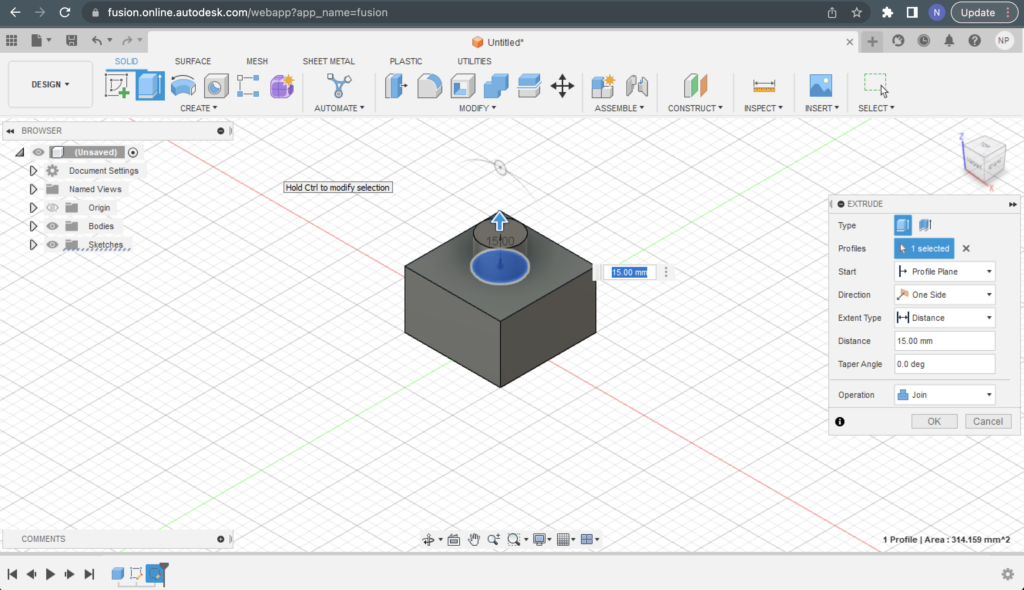
6. Click “OK” and you’re done! Make sure to save your work with the button in the top left corner so that you can marvel at your accomplishment and use it as a reference.


For additional help and resources, there’s a Q&A forum on “Extruding a solid body”. There also multiple videos online such as this one which can teach you the basics of extruding and also go more in-depth.
This is helpful! I wish I had this information when making my 3D snow globe! Fusion 360 has many features, which I found very overwhelming, but I realized once you understand the elements, they are pretty user-friendly. The extruding tool is a very convenient and cool feature.
Hey Nithin, this is a really cool feature of Fusion 360! I wish I could have read this tutorial before our Fusion 360 assignment. I would have loved to know how to use the extrude tool to create specifically-shaped extrusions. One more technical thing about your post that I appreciate is that all of the images are the same size. I didn’t do that in my post and I think it makes it a lot easier to read when all of the images are the same size. Great job!