HTML/CSS 101
HTML, CSS, and JavaScript are the bedrock foundations on which the world wide web (and therefore most digital humanities projects) are based.
- HTML provides the basic structural markup that tells your browser what to do with the information on your page.
- CSS dresses up your plain content in fancy clothes, by adding styling and layout.
- JavaScript drives the behaviors of most websites. That is, the interactions and reactions we have come to expect from the modern web.
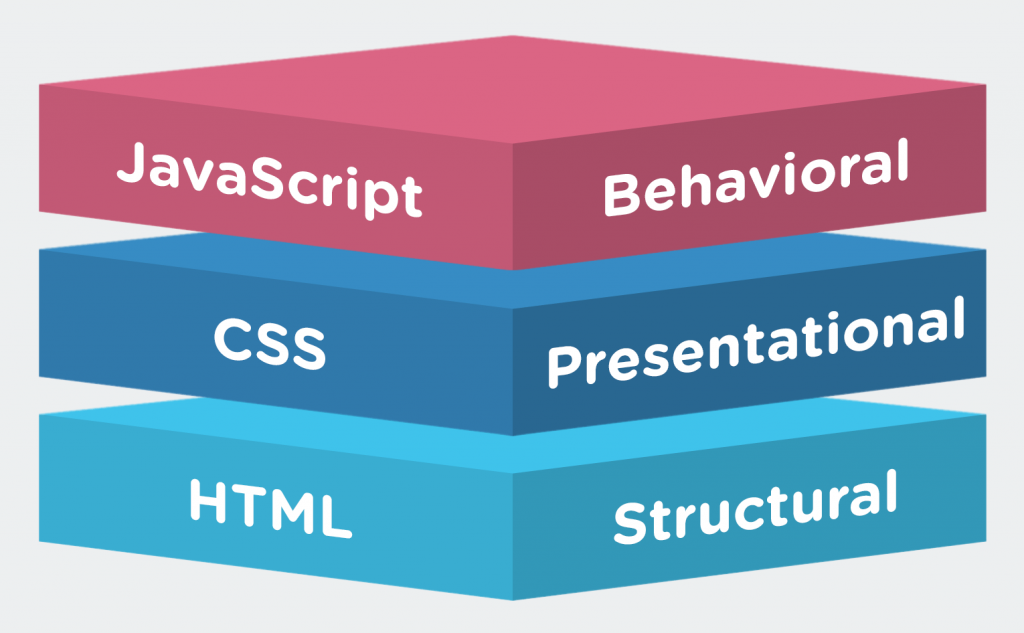
These rules are not hard and fast and there is some overlap. HTML5 has now added semantic elements that describe portions of a page rather than just creating buckets to hold content, and in the early days, HTML offered rudimentary styling and layout support as well. But Cascading Style Sheets, i.e. CSS, offers a much superior method of making all the different elements of your pages look exactly how you want them to look, and go exactly where you want them to go. The biggest benefit of style sheets is that one sheet can influence the appearance of an infinite number of pages, allowing you to update code in only one place to change anything from the color of text to the positioning of an element.
In Class: Hacking with jsBin

To get the hang of how these three languages fit together we are going to explore some examples I set up in jsBin. This code sharing site is a fantastic tool in the hacker’s toolbox, since it lets you copy and edit code in the cloud without having to invest in your own setup or FTP files to a server, view the output live, and then share all of it with others really easily. We’ll be making a lot of use of jsBin in this class (or you could use similar sites like Codepen, jsFiddle, Glitch, etc.), so get used to the interface.
The first example is basic, and will let you test out what each of our three major client side languages does, and hack away to make modifications.

Go to http://jsbin.com/busimo/edit?output, follow the instructions, and start hacking.
JavaScript
JavaScript is the lingua franca of the modern responsive web, and almost all the pages you interact with online use it in some form or other. As with the other things we’re learning in this class, our aim is not to memorize every aspect of the language and become experts overnight, but to gain enough understanding of what it is and how it works so that we can ask the right questions when conceiving our own projects and can intelligently leverage the hard work of people who know these things much better than we do. Thank heavens for JavaScript libraries.
One of these is the Google code-prettify.js library, which is in use on this site and is what makes all of your code examples look nice!
Julie Meloni has written several how-to guides for programming, and has very helpfully posted two gentle introductory lectures pitched at Digital Humanists on Slide Share. We covered some of this material in class, but here are the full lectures to peruse at your leisure.
In Class: More hacking with jsBin
We’re going to start by returning to our jsBin example and hack on the JS there to see if we can make changes.
Go to http://jsbin.com/busimo/edit?output, follow the instructions.
In Class: DevTools
In class, we will work together to try out the rudiments of HTML and CSS, and by using the inspector tool built into modern browsers.
We are are going to use the Chrome browser for this today, since the DevTools in Chrome are a very useful tool for web development.
- DevTools for Beginners: Get Started with HTML and the DOM
- DevTools For Beginners: Get Started with CSS
If you regularly use a different browser you can also checkout the comparable tools for Firefox and Apple’s Safari, but I would recommend reducing confusion by sticking with Chrome’s until you get the hang of it before figuring out how others differ.
Reflective Blog Post (due Friday)
There are many excellent resources for learning the fundamentals of web development. If you want to build pages from scratch from the ground up, pick your favorite code school or tutorial series from the resources section below and go crazy. In this course, however, we are primarily hacking and modifying other people’s code for our own purposes, rather than building from scratch, so we will keep it simple.
Your assignment is to complete two tutorials on HTML Dog.
- Take two courses, on 2 out of 3 of
- HTML,
- CSS,
- JavaScript
Many of you already have some HTML experience, and a few already have CSS or JavaScript experience. If you’re an experienced user, chose a lesson further down the list and challenge yourself. If you’re new to web development start near the top with the beginner courses.
Then, write a blog post that reflects on your experience with coding so far, and engage in the debate within the DH community over whether or not humanities students should learn to code. Your post should include the following:
- A clear statement in the first paragraph of your position either for, against, or rejecting the premise.
- At least one quotation from the assigned readings: Kirschenbaum for, or Donahue against.
- A discussion of your prior coding experience
- Include at least one code sample in your post that supports your position, by using the CODE block, which wraps the code in PRE tags.
Resources
HTML CHEAT SHEET
All the most commonly used tags, courtesy of A Simple Guide to HTML
Alt Text primer on why you should always use it and how to do so in WordPress
Here are some places to go for more information If you need a refresher on the tools we used in class
- A quick rundown on the basics of the fantastically useful Digital Color Meter for Mac OS X, which lets you grab precise colors from images to use in your CSS.
There are LOTS of places to learn coding on the web for free. Here are a few further HTML/CSS resources:
- w3schools.com is one of the most comprehensive sites around, with many excellent lessons and a handy “TryIt” tool that lets you see your code in action.
- HTML Dog have several minimal example pages for specific effects you might want to achieve.
- A handy list of the most common HTML elements to familiarize yourself with at ReWritables.net.
- Since Carleton has an institutional subscription, you can also check out the HTML and CSS video tutorials on Lynda.com if you’re hungry for more.
- A straightforward HTML assignment of constructing your first page from the ground up from the folks at UCLA’s Digital Humanities 101 course.
If you find another that’s helpful, pass it along in your blog post.

I think this will do italics
wow, very smart
will this strikethroughcomment
learning HTML today
learning HTML today
learning HTML today
learning HTML todayComment to be experimented
Trying ‘strong’ on both side
This is so cool. In fact, I am going to express this feeling like this.
I love Carleton
comment
People should play more frisbee
Fun lab!this is bolded
Here’s a quick plug for
I found this video that’s super helpful with HTML basics: here
There’s a neat website I found called Google that sometimes gives helpful answers to questions!
I love Google. I use the website all the time.
Glad to see another Google enjoyer.
I have no idea what this will look like when I finish messing with it…
This word is bold
I love Carleton
Here is a bold word.
wow I love HTML
is the same webpage you’re on right now.
One word here is bold.
This class is code citywelcome to coding municipality
This is the i tag
I found this very fun. text
testing typing
This is the i tag I am using
Welcome to jsBin online code editor!
This is a super useful tool that lets you try out and edit code and see the changes “live” in the Output pane.
You are in that pane now, but there are five tabs up top. They give you the equivalent of having separate .html, .css and .js files all in one place in the cloud!
Follow these instructions to play around:
A quick brown fox jumps over the lazy dog.
wordpress is weird
Does this bold my comment?
Here’s a quick plug for
for i in range(5):

print("Hello!")
This is the i tag<\i> I am using
Commenting on this lab page. Useful link