Introduction
The stringr package is a popular package in R for working with strings. It provides a consistent and easy-to-use set of functions for manipulating and analyzing text data. Here are some of the key features of the stringr package:
- Consistent syntax: All functions in
stringrfollow a consistent syntax that makes it easy to remember how to use them. Most functions start withstr_followed by the action you want to perform, such asstr_extractfor extracting a pattern from a string, orstr_replacefor replacing a pattern in a string. - Text manipulation functions: The package includes a wide range of functions for manipulating text data, such as
str_trimfor removing whitespace from the beginning and end of a string,str_padfor adding padding to a string, andstr_subfor extracting a substring from a string. - Regular expression support:
stringrprovides full support for regular expressions, which are a powerful way to search for and manipulate text patterns. Many of the functions instringrcan take regular expressions as arguments, and the package also includes its own set of regular expression functions for more advanced text manipulation tasks. - Integration with other R packages:
stringrintegrates well with other popular R packages, such asdplyrandtidyr, making it easy to work with text data in a larger data analysis pipeline.
Overall, the stringr package is an essential tool for anyone working with text data in R. Its consistent syntax, wide range of text manipulation functions, and support for regular expressions make it a powerful and flexible package for analyzing and manipulating text data. This is exactly why I believe it is extremely useful for the digital arts and humanities. With so many DGAH projects requiring data cleaning to prepare visualizations of text analysis, alumni locations, and much more, stringr is able to perform the needed manipulation of often messy strings. I believe stringr is more valuable than tools like OpenRefine because knowing the code (or following the package cheat sheet) allows for users to easily command what data manipulation to be done, rather than having to search for string manipulation methods using OpenRefine’s mainly point-and-click system.
Tutorial:
1. Install and open R-Studio to your desktop. Another way, if you are a Carleton student, is to use Carleton’s Maize Server version of R.
2. Create a new R Markdown to begin your R work.

3. Import or create your data set into R. Either import a csv file or create your data set by using data.frame and manually entering your table. Then, run your code chunks to create the data set into R.

4. Now we have a data set that can be used for cleaning. Here is an example of data cleaning using stringr. We want to clean the Fruit names so they are more uniform and readable. Specifically, we want to remove the unnecessary characters like numbers, hyphens, etc.

5. In order to accomplish this goal, we do some base cleaning commands using stringr. Specifically we will use str_sub to compile a clean list of all of the fruits in our dataset. Since the fruits are 5 letters long, with the unnecessary characters coming after, we can just extract the first 5 characters. Now, we are left with a simple, uniform, clean list of the fruit names.

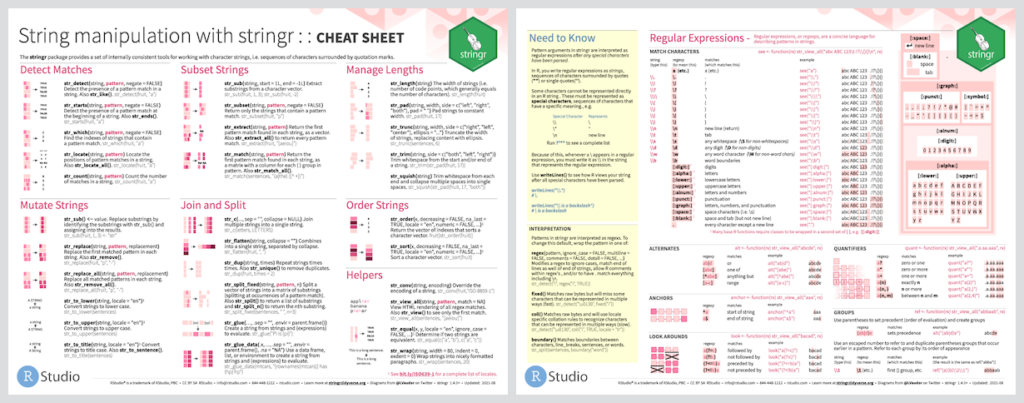
You can use stringr to accomplish so many more things. Below is a useful cheat sheet that provides some guidance of stringr’s potential and its useful commands. Also, for additional guidance on using stringr for data cleaning, here are 2 videos that are useful (1 and 2).

Really nice tutorial, Chris! The steps were easy to follow, and the screenshots help a lot as well! They were well selected and placed. I feel like you were able to explain a fairly complex topic very well! It seems like a very good way to clean data in R, and I appreciated the added cheat sheet as well!
This is a super helpful tutorial! I really like that you began your tutorial with a summary of the benefits of using Stringr. Your screenshots are really effective, and I especially appreciate the circling and arrows that you drew on them. It makes it much faster and easier to understand what steps you are referencing! Nice addition with the Stringr cheat sheet, too. Now I’m intrigued and want to try out Stringr.